
The Theme Fixer is TurboLoad's flagship optimization capability. It moves beyond passive monitoring by directly and safely resolving performance defects inside your Shopify theme code.
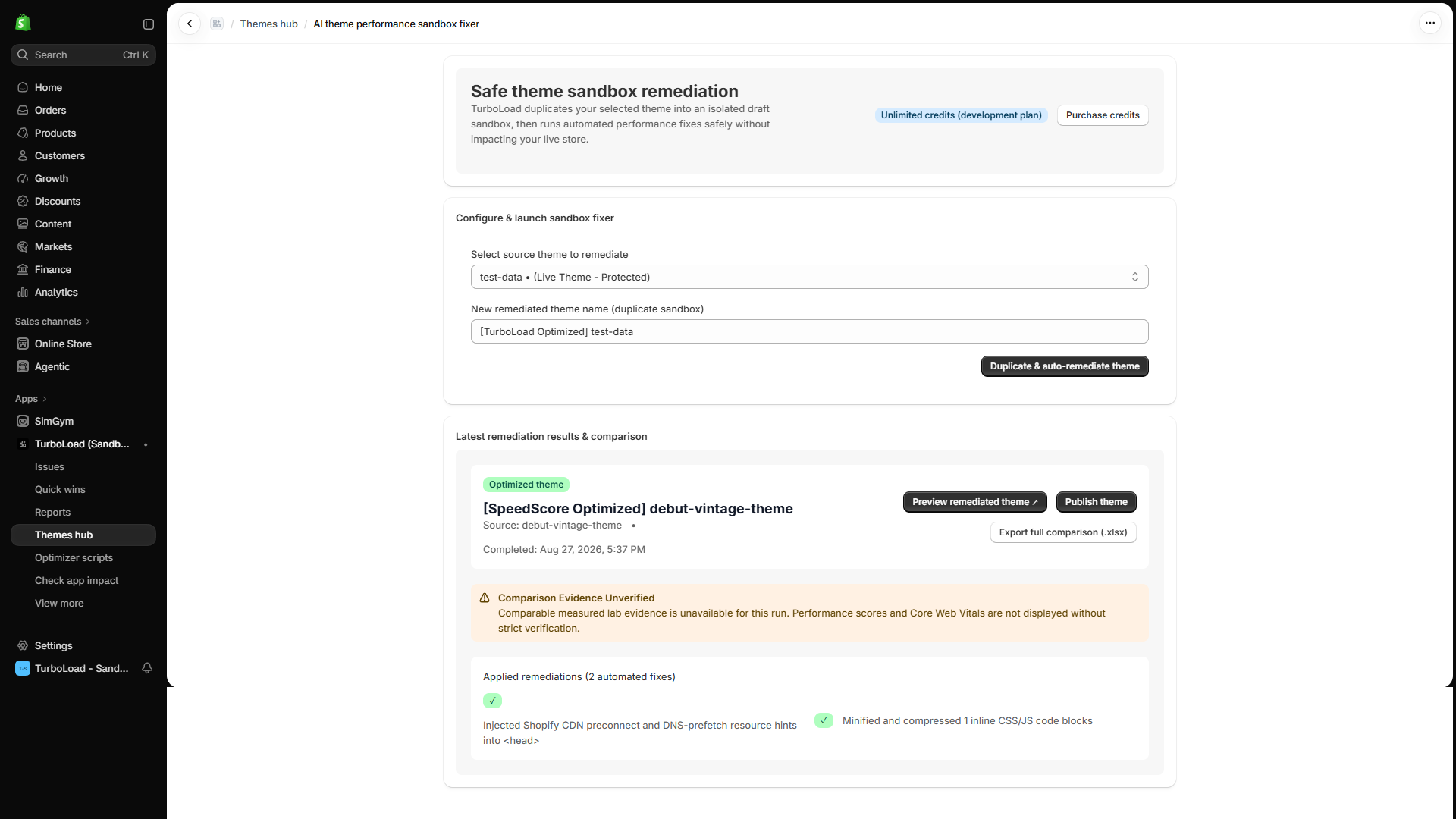
How does the TurboLoad Theme Fixer optimize code safely? #
The TurboLoad Theme Fixer duplicates your published theme into an isolated draft sandbox (e.g. [TurboLoad Remediation] <Theme Name>). It then applies automated code enhancements—such as deferring render-blocking scripts, adding preconnect resource hints, and fixing layout shift attributes—completely away from live shoppers. Merchants preview the remediated theme in an interactive sandbox and publish live only when 100% satisfied.
The Zero-Risk Safe Sandbox Guarantee #
Merchants often fear speed optimizations because poorly written modifications can break cart buttons, navigation drawers, or third-party checkout flows.
TurboLoad eliminates this risk entirely with our Safe Sandbox Guarantee:
We NEVER edit your live published theme. When you run the Theme Fixer, TurboLoad creates an exact duplicate copy in your theme library named: [TurboLoad Remediation] <Your Theme Name> All automated code optimizations are executed inside this isolated draft theme. Your live store continues serving shoppers without a single millisecond of interruption or risk.
Automated Theme Code Optimizations Performed #
TurboLoad's intelligent optimization engine analyzes your theme templates and applies the following surgical fixes:
- Intelligent Script Deferral:
Locates render-blocking scripts in your theme layout and sections, converting them to non-blocking execution patterns while strictly preserving functionality and execution order. - Image Dimension & Lazy-Loading Enforcement:
Detects images lacking explicit width and height attributes (the primary cause of layout shifts / CLS) and ensures below-the-fold images lazy load smoothly. - Critical Resource Preconnecting:
Pre-establishes early connections for essential assets, including your Shopify CDN and web fonts, so hero sections appear instantly. - Theme Code Cleanup:
Eliminates redundant conditionals and trims bloat in critical rendering paths.
Step-by-Step Theme Remediation Workflow #
Step 1: Initiate a Fixer Job #
- Go to Themes → Theme Fixer (
/app/themes/fixer). - Select the theme you wish to remediate.
- Choose the optimization rules to apply (or select All Recommended Optimizations).
- Click Start Automated Remediation.
Step 2: Review the Interactive Code Diff #
Once the job finishes (typically in 10–20 seconds):
- An interactive Side-by-Side Diff Viewer displays every file modified.
- Green highlighted lines show additions (e.g.
defer,loading="lazy"). - Red highlighted lines show eliminated bottlenecks.
Step 3: Test with 1-Click Preview Link #
- Click the Preview Draft Theme button.
- This opens your store using Shopify's official theme preview session (
?preview_theme_id=...). - Browse your catalog, add products to cart, and test checkout to verify 100% visual and functional perfection.
Step 4: Publish or Roll Back #
- Ready to launch? Click Publish Remediated Theme to promote the optimized draft to your live storefront.
- Want to revert? Click Discard / Rollback to archive the draft theme without touching anything else.
Exporting Fixer Evidence Reports #
Need compliance proof or documentation for your development team?
- Click Export Report on any completed job to download:
TurboLoad-FixerReport-<ThemeName>-<YYYY-MM-DD>.xlsx - Contains complete before/after file lists, optimization diffs, and timestamped evidence records.
Remediation Credits & Credit Packs #
To provide flexible access for both occasional optimizers and high-velocity agencies, TurboLoad uses an intuitive credit system for the Theme Fixer:
- 1 Credit = 1 Complete Theme Remediation Run: Reserves when you initiate an automated remediation. Clones your theme into a draft sandbox, executes all code optimizations, generates the interactive side-by-side diff, and creates your live preview link.
- Auditing & Previews are Free: You can audit any theme in your library and preview remediated drafts as many times as you like without consuming credits.
- Included Monthly Plan Allowances:
- Free Plan: 0 included credits (theme auditing is always free; on-demand credit packs available).
- Shopify Basic ($15/mo): Includes full telemetry & draft sandbox fixes.
- Shopify Standard / Advanced / Plus: Expanded limits aligned to store scale.
- On-Demand Add-On Packs (Shopify One-Time Purchase):
- Starter Pack (3 Credits): $9.99 ($3.33/run).
- Pro Pack (10 Credits): $24.99 ($2.50/run — Most Popular).
- Agency Pack (25 Credits): $49.99 ($2.00/run — Best Value).
- Unused on-demand credits never expire and roll over automatically.
Automated Integrity & Code Safety Validation #
To ensure that no syntax errors or template incompatibilities ever reach your theme:
- Pre-Compilation Verification: Every modified Liquid file is checked for balanced tags (
{% if %},{% endif %}), valid HTML structures, and proper asset syntax before saving. - Fail-Safe Abort: If any ambiguity or syntax conflict is detected during optimization, the automated engine aborts the change and flags the file for merchant review.
- Total Rollback Protection: Because optimizations exist in a draft theme, your published store remains 100% untouched until you explicitly click publish.
Compliance & Sandbox Safeguards (Gate 5.1.1 & 1.1.4 Notice) #
Shopify Theme Guidelines Compliance:
TurboLoad strictly adheres to Shopify's Theme App Extension architecture for all live storefront tracking and script deferral. The Theme Fixer operates exclusively within duplicate draft sandboxes created with merchant authorization. No live code is altered without merchant initiation.
Estimation Transparency:
Before-and-after speed comparisons and estimated conversion recoveries represent diagnostic models derived from published eCommerce benchmarks and real-user telemetry. They do not constitute financial warranties or guaranteed sales outcomes.