
Every merchant faces the App Store Dilemma: your marketing team wants to install a new review widget, loyalty program, or spin-the-wheel popup, but you worry it will destroy your store's load speed and hurt conversion rates.
TurboLoad's Predictive App Impact simulator solves this problem by forecasting the exact performance impact of an app before you install it.
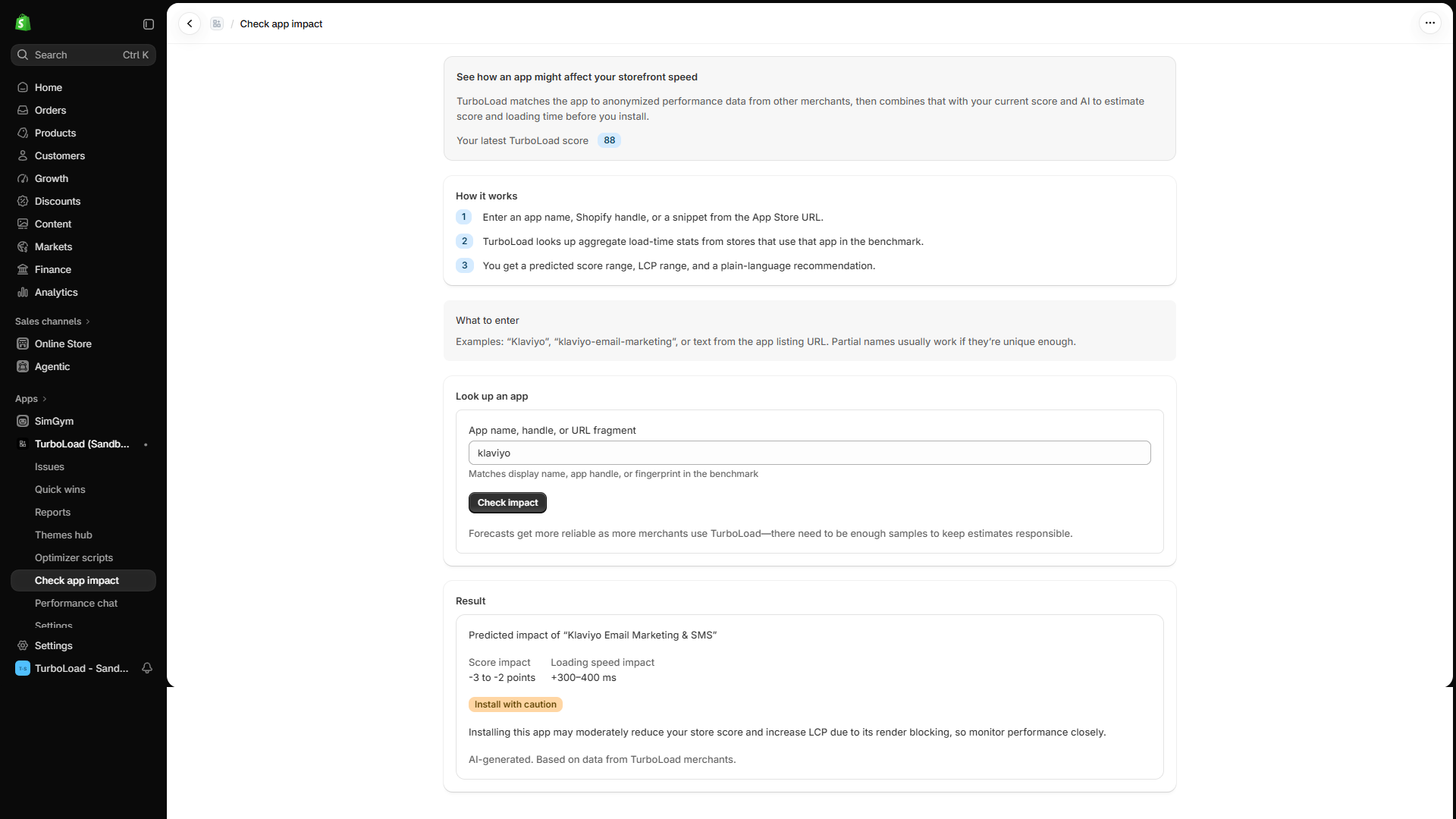
How does TurboLoad forecast Shopify app performance? #
TurboLoad maintains a benchmark database of popular Shopify App Store applications, indexing their script payload weights, third-party network requests, and main-thread execution footprints. When you simulate an app, TurboLoad pairs these benchmarks with your store's active theme architecture to forecast the resulting change in Core Web Vitals (LCP, INP) and overall speed score before you write a single line of code or install an embed.
Why Simulate Before Installing? #
- Avoid Costly Trial-and-Error: Installing an app, finding out it adds 800ms of lag, and uninstalling it often leaves orphaned code snippets and tracking pixels in your theme.
- Data-Driven App Selection: When deciding between three competing review apps (e.g., Judge.me vs. Yotpo vs. Loox), simulate all three to see which delivers the lightest footprint for your store's specific theme.
- Make Informed ROI Decisions: Balance business utility against speed impact with clear, objective numbers.
How to Run an App Impact Prediction #
1. Open the Predictor Tool #
Navigate to AI Predict (/app/predict) in the TurboLoad navigation bar.
2. Select or Search for an App #
- Use the App Search bar to find any popular Shopify App Store application by name or paste its Shopify App Store URL.
- TurboLoad matches the app against our global catalog of benchmarked Shopify applications.
3. Review the Impact Projection #
Within seconds, the simulator generates a detailed forecast:
- Projected Score Delta: For example:
Expected Score Change: 92 ➔ 84 (-8 points). - Projected Core Web Vitals Impact:
- 🟡 LCP Impact: Estimated delay on hero rendering (e.g.
+320ms). - 🔴 INP Impact: Estimated main-thread locking from tracking scripts (e.g.
+140ms).
- 🟡 LCP Impact: Estimated delay on hero rendering (e.g.
- Risk Assessment Badge:
- 🟢 Low Risk: Negligible impact (<3% score shift; clean script execution).
- 🟡 Moderate Risk: Moderate overhead; recommendation to enable script deferral.
- 🔴 High Risk: Heavy synchronous payload; likely to noticeably degrade mobile shopper experience.
4. Proactive Mitigation Advice #
If the app is labeled Moderate or High Risk, TurboLoad provides tailored recommendations:
- Suggested deferral rules for the Storefront Optimizer.
- Lighter alternative apps that achieve similar marketing objectives with smaller JavaScript footprints.
Global App Intelligence & Benchmark Transparency #
TurboLoad benchmarks hundreds of the top Shopify App Store plugins:
- Objective Measurement: Benchmarks reflect real-world browser execution times, not vendor marketing claims.
- Continuous Updates: App ratings and script execution benchmarks are refreshed regularly as app vendors publish new updates.
- Smarter Tech Stacks: Confidently equip your marketing, support, and sales teams without sacrificing mobile conversion performance.