
Understanding why your store's speed changes can be daunting. The AI Performance Advisor acts as your dedicated on-demand performance engineer, translating complex browser waterfall data and Core Web Vitals into plain-English answers and actionable solutions.
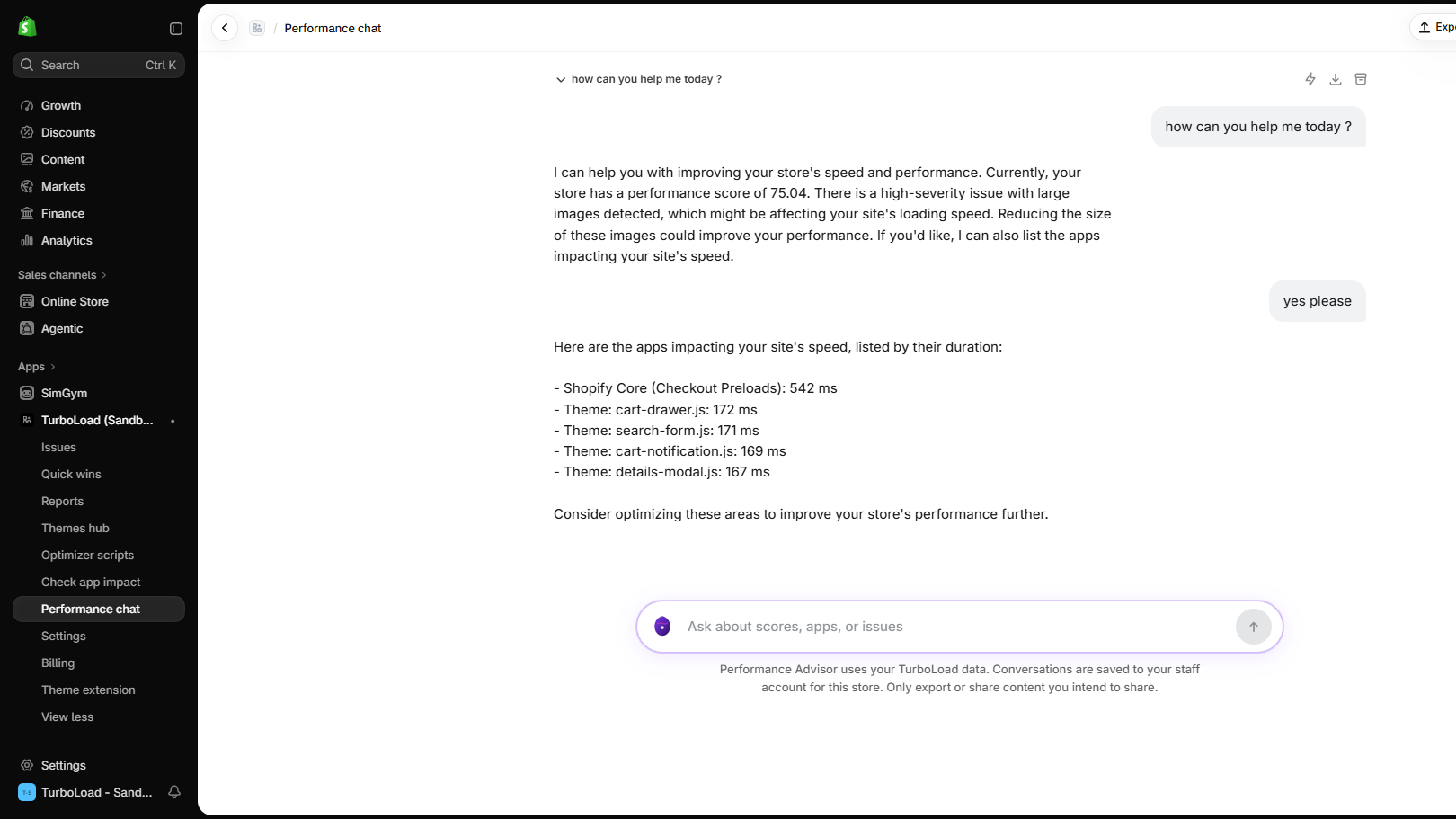
How does the TurboLoad AI Performance Advisor work? #
The TurboLoad AI Performance Advisor analyzes your store's real-user speed metrics, theme structure, and third-party script execution in real time. Merchants can ask natural language questions (e.g. "Why did my mobile speed drop?" or "Which app is slowing down checkout?") to receive immediate root-cause breakdowns, estimated metric lift projections, and copyable Liquid code fixes verified for Shopify themes.
What Can the AI Advisor Do? #
The AI Advisor connects directly to your store's live telemetry, web vitals metrics, and theme structure to answer questions like:
- "Why did my mobile performance score drop from 88 to 72 over the weekend?"
- "Which installed apps are creating the biggest lag during mobile checkout?"
- "What specific code changes should I make in
theme.liquidto improve Largest Contentful Paint?" - "Can you write a Liquid snippet to preload my hero banner image on the homepage?"
Step-by-Step: Using the AI Chat #
1. Open the Chat Interface #
Click AI Chat (/app/chat) in the TurboLoad navigation bar.
2. Ask a Question or Choose a Quick Prompt #
You can type any question or click one of the pre-built quick prompt pills:
- ⚡ Diagnose My Largest Issues
- 📱 Improve Mobile INP Score
- 🛒 Analyze App Script Overhead
- 🖼️ Optimize Image & Media Assets
3. Review Actionable Root-Cause Guidance #
The advisor responds with:
- Root-Cause Analysis: The exact script, image, or theme section triggering the latency.
- Estimated Metric Impact: How much LCP or INP improvement to expect.
- Code Snippets: Drop-in Liquid or HTML adjustments with clear instructions.
Exporting Conversations (Markdown & JSON) #
Need to hand off the AI's recommendations to your web agency, freelance developer, or internal team?
You can export any conversation with a single click:
- In the top right corner of the chat window, click Export.
- Select your preferred format:
- Download as Markdown (
.md): Perfect for pasting into GitHub Issues, Notion docs, Jira tickets, or Linear tasks. File name format:turboload-chat-<conversation-id>.md. - Download as JSON (
.json): Formatted structured portable bundle (turboload.chat.export) suitable for external AI models, audits, or backup records. File name format:turboload-chat-<conversation-id>.json.
- Download as Markdown (
Privacy & Enterprise Data Governance #
TurboLoad is engineered with strict data privacy boundaries:
- Zero Customer Data Exposure: Shopper personal information (PII), customer names, email addresses, order amounts, and payment tokens are never accessed or sent to AI models.
- Isolated Store Scoping: Diagnoses are generated strictly within your store's verified boundary without cross-tenant data leakage.
- Enterprise Security: All queries and AI responses are encrypted in transit via TLS 1.3.