
Before publishing a major theme redesign or launching holiday campaign templates, merchants need to know how the new theme will perform before it affects live sales.
TurboLoad's Multi-Theme Auditing feature allows you to evaluate any theme in your Shopify library—published or unpublished—side-by-side.
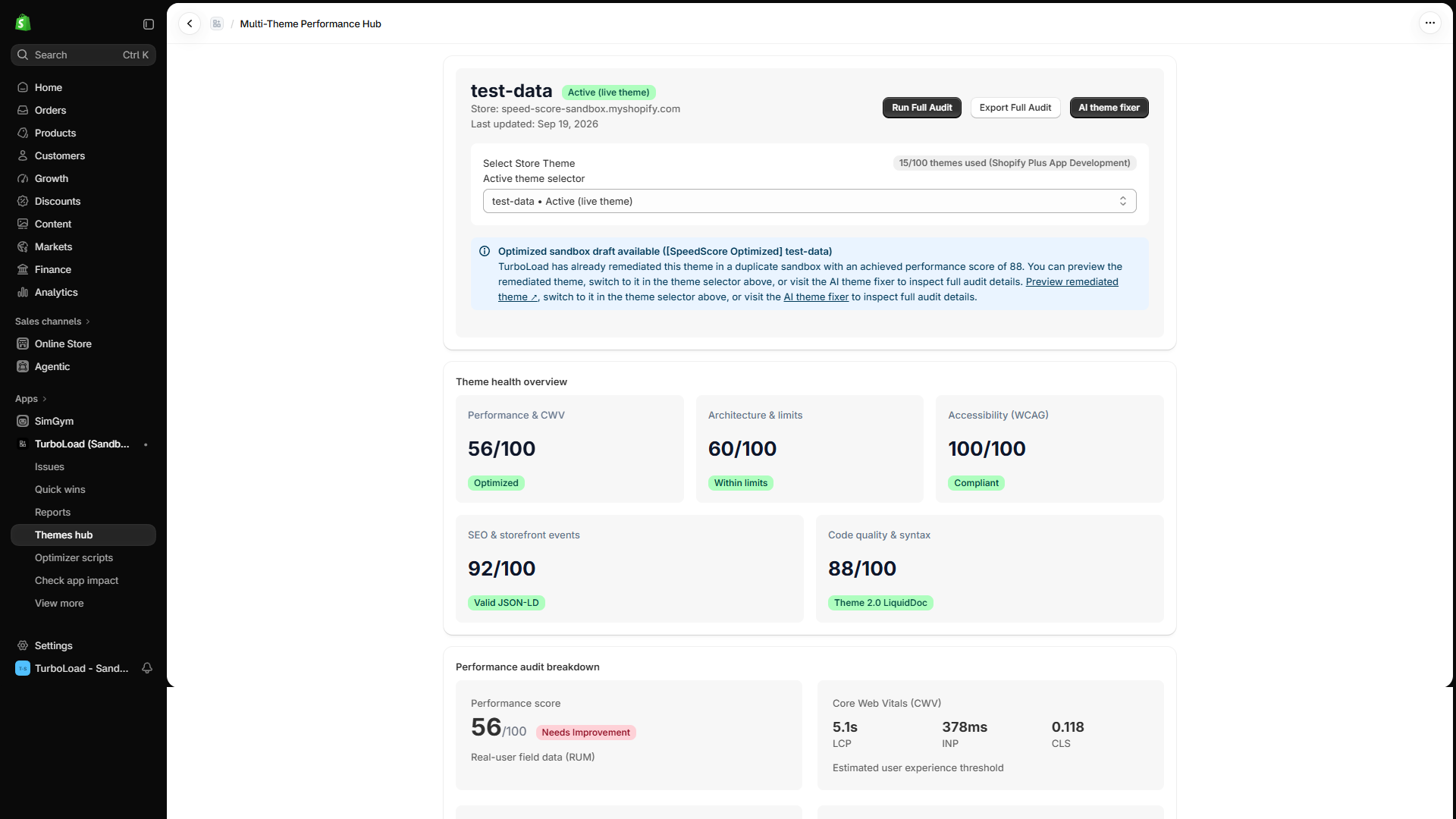
How does TurboLoad audit unpublished draft themes? #
TurboLoad accesses your store's theme library to analyze Liquid templates, CSS stylesheets, and JavaScript files across both published and draft themes. It assesses Core Web Vitals readiness, detects render-blocking scripts, flags oversized media assets, and provides a comparative 0–100 health score without requiring you to publish the theme or expose shoppers to unverified code.
Why Audit Draft Themes Before Publishing? #
- Eliminate Redesign Surprises: Never publish an agency redesign only to discover mobile conversion rates plummet due to bloated JavaScript or oversized hero assets.
- Benchmark Theme Candidates: Compare multiple theme options (such as Dawn vs. Horizon vs. a customized theme) to select the fastest foundation for your brand.
- Audit Pre-BFCM Staging Themes: Verify that Black Friday / Cyber Monday promotional code and holiday banners have not introduced performance regressions.
Step-by-Step Theme Audit Walkthrough #
1. Access the Themes Hub #
In the TurboLoad navigation, click Themes (/app/themes).
2. Select a Theme from Your Library #
At the top of the Themes page, use the Theme Selector dropdown. You will see:
- 🟢 Live Published Theme: Labeled with a green active indicator.
- ⚪ Draft & Unpublished Themes: All staging, backup, and development themes stored in your Shopify admin.
3. Review the Theme Health Overview #
Once selected, TurboLoad evaluates the theme across five key pillars:
- Performance & Core Web Vitals (CWV): Real-user field readiness and speed score.
- Architecture & Limits: Total CSS, JavaScript, and Liquid file counts and weight.
- Accessibility (WCAG): Baseline contrast and interactive element compliance.
- SEO & Storefront Events: Structured JSON-LD schema detection and metadata completeness.
- Code Quality & Syntax: Cleanliness of Liquid tags and asset loading hygiene.
4. Export Theme Audit to Excel #
Need to share the audit findings with your web agency or freelance developer?
- Click the Export Full Audit button in the top right.
- TurboLoad immediately downloads a comprehensive spreadsheet:
TurboLoad-ThemeAudit-<ThemeName>-<YYYY-MM-DD>.xlsx - The report includes granular line-by-line asset weights, issues, and specific remediation recommendations.
Developer & Agency Collaboration Guide #
TurboLoad acts as a shared bridge between eCommerce managers and technical developers:
- Shareable Proof: Export audit spreadsheets to assign precise tickets to your web agency.
- Objective Milestones: Set strict contractual requirements (e.g. "Draft theme must achieve a TurboLoad score ≥ 85 before final handover").
- 1-Click Sandbox Launch: Click Fix in AI Sandbox directly from the audit card to generate an optimized draft theme automatically.